SecurityJwtLogin - 1 [프로젝트 설정]
SecurityJwtLogin - 1
[초기 프로젝트 설정]
Dependencies and Version
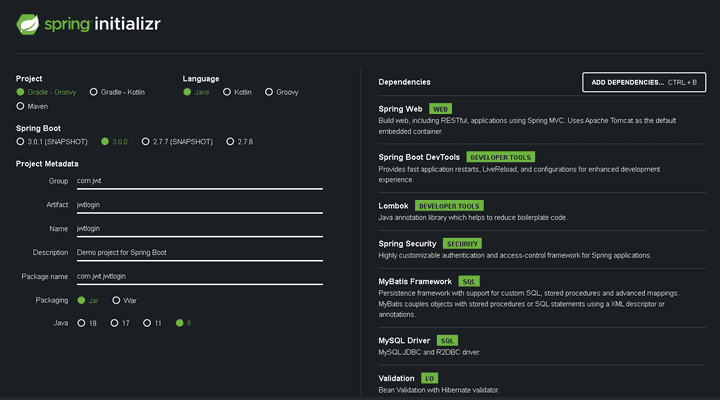
- spring boot 의 경우 3.0.0 은 에러가 발생합니다. 따라서 2.7.6을 선택해줍니다. (되도록 SNAPSHOT은 피합니다.)
기본 설정
Dependency 를 추가할 때 설명이 적혀있지만 한 번 가볍게 살펴보겠습니다.
- Spring Web : Web 관련 Dependency
- Spring Boot DevTools : LiveReload 기능 제공
- Lombok : Annotation 을 통해 Getter, Setter, Constructor 등을 사용가능 하도록 제공
- Spring Security : 인증, 인가 등의 보안을 처리하기에 편리하도록 제공하는 Framework
- MyBatis Framework : Persistence Framework로 DB에 접근할 Connection Pool 등을 담당하고 SQL을 준비할 프레임워크
- MySQL Driver : MySQL 연결할 Driver
- Validation : 유효성 검사 기능 -> 해당 프로젝트에서 사용하지 않을수도 있습니다.
추가 Dependencies
start.spring.io 에서 권장하는 dependency 외에 추가로 dependency들을 추가해줍니다.
- commons-dbcp2 : DataBase Connection Pool 관련 설정
- jjwt-api & jjwt-impl & jjwt-jackson : JWT 관련 설정
최종적으로 아래와 같은 build.gradle 이 만들어집니다.
    implementation 'org.springframework.boot:spring-boot-starter-security'
    implementation 'org.springframework.boot:spring-boot-starter-validation'
    implementation 'org.springframework.boot:spring-boot-starter-web'
    implementation 'org.mybatis.spring.boot:mybatis-spring-boot-starter:2.3.0'

    compileOnly 'org.projectlombok:lombok'
    developmentOnly 'org.springframework.boot:spring-boot-devtools'
    runtimeOnly 'com.mysql:mysql-connector-j'
    annotationProcessor 'org.projectlombok:lombok'
    // DataSource Dependency
    // https://mvnrepository.com/artifact/org.apache.commons/commons-dbcp2
    implementation group: 'org.apache.commons', name: 'commons-dbcp2', version: '2.7.0'
    // Jwt Dependency
    // https://mvnrepository.com/artifact/io.jsonwebtoken/jjwt-api
    implementation group: 'io.jsonwebtoken', name: 'jjwt-api', version: '0.11.2'
    // https://mvnrepository.com/artifact/io.jsonwebtoken/jjwt-impl
    runtimeOnly group: 'io.jsonwebtoken', name: 'jjwt-impl', version: '0.11.2'
    // https://mvnrepository.com/artifact/io.jsonwebtoken/jjwt-jackson
    runtimeOnly group: 'io.jsonwebtoken', name: 'jjwt-jackson', version: '0.11.2'


    testImplementation 'org.springframework.boot:spring-boot-starter-test'
    testImplementation 'org.springframework.security:spring-security-test'
Application 설정
실행에 앞서 application 설정을 진행합니다.
application.yml 에 들어갈 정보
- port : 9999
- context-root : /jwt
- DataBase 설정 및 MySQL Driver
- MyBatis 설정 : alias, mapper 위치
- logging 설정
server:
  port: 9999
  # context-root
  servlet:
    context-path: /jwt

# DataBase Settings
spring:
  datasource:
    hikari:
      maximum-pool-size: 10
      connection-timeout: 5000
      connection-init-sql: SELECT 1
      validation-timeout: 2000
      minimum-idle: 10
      idle-timeout: 600000
      max-lifetime: 1800000
      auto-commit: true
    # MySQL Setting
    driver-class-name: com.mysql.cj.jdbc.Driver
    url: jdbc:mysql://localhost:3306/security?serverTimezone=UTC&useUniCode=yes&characterEncoding=UTF-8
    username: junhyxxn
    password: 9999
    # DataSource
    type: org.apache.commons.dbcp2.BasicDataSource

#MyBatis Setting
mybatis:
  type-aliases-package: com.home.vo.**
  mapper-locations: classpath:/mapper/*.xml

#log level Setting
logging.root: info
logging.level.com.jwt: debug
실행
- 초기 화면
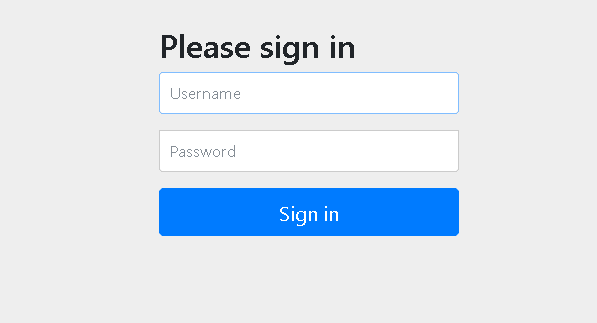
- 위와 같이 왠지 모를 로그인 창이 보이는 것을 알 수 있다.

- 로그를 확인해보면
- Spring Security 의 자동설정 관련된 UserDetailsServiceAutoConfiguration 으로 인해 발생된 페이지임을 알 수 있다.
- Username 에는 user, password에는 로그에 기록된 값을 입력하게 되면 / 페이지로 이동하게 된다.(현재는 기본 페이지가 없으니 당연히 404 Page 로 간다)
💥 여기까지 정상적으로 실행됐다면, Security가 제대로 적용된 것입니다.
Configuration
매번 로그를 확인해 비밀번호 입력하기 싫으니 설정을 추가로 진행해줍니다.
잠시 위에서 확인했던 UserDetailsServiceAutoConfiguration은 Spring Boot의 Security 설정 파일인
SpringBootWebSecurityConfiguration 클래스에서 설정이 진행되는데,
SpringBootWebSecurityConfiguration 는 WebSecurityConfigurerAdapter 가 있다면 그 설정 값을 그대로 쓰게 됩니다.
⭐ 즉, WebSecurityConfigurerAdapter를 상속받아 설정을 작성하면 Custom Configuration을 이용할 수 있습니다.
SecurityConfig
- 기본적인 설정만 진행하고 우선 편의상 모든 request의 접근 제한을 해제한다.
- @EnableWebSecurity : @Configuration + 추가 설정
- @EnableGlobalMethodSecurity : @PreAuthorize, @PostAuthorize 사용을 위해 설정합니다.
import org.springframework.http.HttpMethod;
import org.springframework.security.config.annotation.method.configuration.EnableGlobalMethodSecurity;
import org.springframework.security.config.annotation.web.builders.HttpSecurity;
import org.springframework.security.config.annotation.web.builders.WebSecurity;
import org.springframework.security.config.annotation.web.configuration.EnableWebSecurity;
import org.springframework.security.config.annotation.web.configuration.WebSecurityConfigurerAdapter;
import org.springframework.security.config.http.SessionCreationPolicy;

@EnableWebSecurity // @Configuration + 추가 몇몇 설정
@EnableGlobalMethodSecurity(prePostEnabled = true) // Method 단위로 @PreAuthorize, @PostAuthorize 사용 가능하도록 설정
public class SecurityConfig extends WebSecurityConfigurerAdapter {

    // web 설정
    @Override
    public void configure(WebSecurity web) throws Exception {
        web.ignoring()
                .antMatchers(HttpMethod.OPTIONS, "/**")
                .antMatchers("/favicon.ico");
    }

    @Override
    protected void configure(HttpSecurity http) throws Exception {
        http
                // CORS, CSRF 설정
                .cors()
                .and()
                .csrf().disable()

                // Session 설정 -> JWT 방식 로그인 구현 -> StateLess
                .sessionManagement().sessionCreationPolicy(SessionCreationPolicy.STATELESS)

                // request의 resource 접근 제한 설정
                .and()
                .authorizeHttpRequests()
                .antMatchers("/**").permitAll();
    }
}
🎯 설정이 정상적으로 성공했다면 아까와 달리 login 화면이 보이지 않습니다.
🌈 이것으로 기본 설정은 끝났습니다. 이제 본격적으로 Security + JWT 로그인을 구현해보겠습니다.
🌈 모든 코드는 junhyxxn GitHub에서 확인할 수 있습니다!!